 | Logo by Alkaron (anonymous IP: 216.73.216.116,2512) | |||||||||||||
| ||||||||||||||
 Audio (351) Datatype (51) Demo (213) Development (628) Document (24) Driver (102) Emulation (155) Game (1061) Graphics (516) Library (123) Network (243) Office (69) Utility (961) Video (74) Audio (351) Datatype (51) Demo (213) Development (628) Document (24) Driver (102) Emulation (155) Game (1061) Graphics (516) Library (123) Network (243) Office (69) Utility (961) Video (74) Total files: 4571 Full index file Recent index file
Amigans.net Aminet IntuitionBase Hyperion Entertainment A-Eon Amiga Future
Support the site
|
      amistaller is an AmigaOS 4.1 FE package installer and orchestrator designed
to install software packages defined in a YAML manifest. It supports
downloading archives over HTTP or HTTPS (with SHA256 verification), extracting
a variety of archive formats via xadmaster.library, running pre/post install
scripts, and resolving package installation order based on declared
dependencies.
Who this is for
----------------
- AmigaOS developers and maintainers who want an unattended package
installer for collections of software.
- System integrators preparing curated application bundles for AmigaOS
environments.
- Developers who need reproducible package installation flows with
validation, dependency handling and custom pre/post install steps.
What it does
------------
- Parses a YAML package definition file describing packages, metadata,
dependencies and scripts.
- Validates the manifest: schema checks, required fields (title and
either url or file), dependency resolution and cycle detection.
- Downloads package archives over HTTP or HTTPS, using AmiSSL for secure
connections, with optional SHA256 verification and caching in T: or Ram:.
- Extracts archives using xadmaster.library (supports multiple formats
such as LHA, ZIP, LZX, etc.).
- Runs pre-install and post-install shell scripts with variable
substitution (%TARGETDIR%) and error logging.
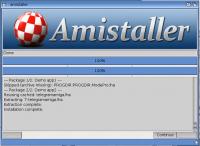
- Displays progress via a GUI and automatically logs to a file (if LOG
argument is provided via CLI). **All installation activity** (including
downloads, extractions, and scripts) is captured in the log file.
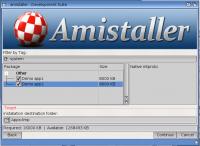
- Lets users choose the installation destination with a folder requester or by
dragging a target folder from Workbench onto the installer window.
Works in both Workbench mode (double-click icon) and CLI mode (shell
arguments).
How it works (architecture)
---------------------------
- YAML Parser: reads the manifest and maps packages into an internal
AmistallerPackage structure (id, title, url/file, sha256, deps,
scripts).
- Validation: checks that each package has required fields (title and
either url or file). Resolves relative local archive paths against the
YAML directory. If a local file cannot be accessed, a warning is issued
and the package is hidden from the installer screens. Verifies dependencies
(unknown or circular dependencies cause validation errors).
- Installer/Orchestrator:
For each package it:
1. Runs preinstall scripts (if any) with %TARGETDIR% substitution.
Errors are logged but don't stop installation.
2. Acquires the archive: for local files, locates them relative to the YAML
directory (using the same path resolution as licence and header files).
For remote URLs, downloads and caches in T: or Ram:.
SHA256 is calculated when verification is requested.
3. Extracts the archive using xadmaster, preserving directories and
file metadata. Extraction progress is logged per-file.
4. Runs postinstall scripts with %TARGETDIR% substitution.
Errors are logged but installation continues.
- Logging: messages from installation, download, extraction, and scripts
are written to both the GUI progress screen and optional log file via
a shared logging utility (src/utils/logging.c) with error detection
(disk full warnings).
- Extraction: uses xadmaster.library proper API: call xadGetInfo() to
enumerate entries and xadFileUnArc() with XAD_ENTRYNUMBER to extract
each file. This supports multi-archive formats transparently.
- Downloading: uses OSSL_HTTP_get(); HTTPS connections add TLS through a
callback. Downloads are streamed to disk while computing SHA256 when
requested.
| |||||||||||||||||||||||||||||||||||||||||||||||||||||||||||||||

| Copyright © 2004-2026 by Björn Hagström All Rights Reserved |