![]() | Logo by Liksmaskaren (anonymous IP: 216.73.217.142,2485) | |||||||||||||
| ||||||||||||||
Audio (349) Datatype (51) Demo (206) Development (621) Document (24) Driver (102) Emulation (155) Game (1036) Graphics (514) Library (120) Network (240) Office (69) Utility (956) Video (74) Total files: 4517 Full index file Recent index file
Amigans.net Aminet IntuitionBase Hyperion Entertainment A-Eon Amiga Future
Support the site
|

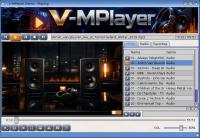
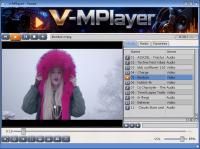
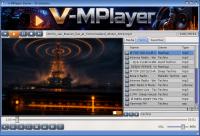
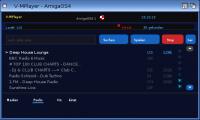
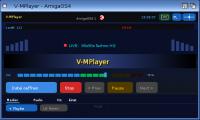
V-MPlayer v1.1 for AmigaOS 4.1 =============================== V-MPlayer is a modern media player for AmigaOS 4.1, written in Hollywood. It uses a custom-compiled MPlayer binary as its playback engine, enhanced with ARexx support and hardware-accelerated video output via VA-API. Tested on X5000 with RX580 graphics card. Note for QEMU and Pegasos 2 users: change the video output setting in the MPlayer configuration from vo=vaapi to vo=comp or vo=sdl. WHAT'S NEW IN v1.1 ------------------ MPlayer binary updates: - Fixed -vo option being ignored when VAAPI was active (affected X1000 with HD7750 and other non-VAAPI cards) - Fixed va.library being opened even when a software video output was requested (-vo comp, -vo sdl etc.) - Fixed duplicate video output drivers appearing in -vo help output - Corrected video output driver priority order - OSD CPU optimisation: draw_osd() no longer runs every frame, reducing CPU usage at 4K H.264 to 5-8% with osdlevel=0 - Fixed font path resolution for subtitles on AmigaOS4 (PROGDIR: prefix) GUI updates: - Real-time audio visualizer now reads PCM data from RAM: instead of T: for faster access and lower disk I/O - New visualizer modes: Rings (concentric colour rings) and Bounce Bars replacing Fire and Tunnel effects - Visualizer tab: Fire and Tunnel replaced with Rings and Bounce Bars - Radio streaming: va.library and af_export no longer loaded when streaming radio, reducing CPU usage significantly - Radio tab CPU usage reduced from ~20% to ~3% when streaming - Radio tab: loading bar no longer restarts when switching tabs and back - Radio tab: ON AIR blinking dot only appears after stream is connected - Radio tab: BoingBall is now always static (animated only during intro) - Media tab: when streaming radio, the media tab shows station name with LIVE indicator and blinking dot, all other animations are static - Media tab: switching to media tab while radio is streaming now uses a 500ms timer instead of 50ms, reducing idle CPU load - Viz tab: fixed ON AIR bar and status bar appearing when switching from radio tab to viz tab - Pause: CPU usage reduced when playback is paused - Intro animation: switching tabs before animation completes now immediately finishes the animation instead of resuming on return - Miniplayer: progress bar and elapsed time now count correctly when switching between miniplayer and main window during radio streams - Window scaling: last size is now saved and restored on next start - Language setting: English is now the default - Version number shown in Settings tab updated to v1.1 FEATURES -------- Supported formats: Audio: MP3, FLAC, OGG, AAC, WAV, AIFF, MOD, IT, XM, S3M and more Video: MP4, AVI, MKV, MOV, MPEG, FLV, WebM and more Radio: HTTP and HTTPS streams (MP3, AAC, OGG, Shoutcast, Icecast) Main window: The main window provides a clean interface with playlist management, visualizers, volume control and a progress bar with seek support. Buttons: Open, Stop, Previous, Play/Pause, Next. Media tab: Full playlist management with add file, add folder and clear options. The playlist is saved automatically and restored on next start. Filenames with special characters are cleaned automatically on import. Radio tab: Built-in internet radio player with station list and search function. Mark stations as favourites with the star button. Favourites are saved and shown automatically when no search is active. A Fav button lets you return to your favourites list after a search. Double-click a station to play it immediately. The media tab shows the station name with a LIVE indicator and blinking dot when a radio stream is playing. Visualizer modes (click to cycle): OSC - Oscilloscope, shows the raw audio waveform BAR - Spectrum bars, 20-band frequency display MIR - Mirror spectrum, symmetric bar display MTX - Matrix rain, speed reacts to bass level OFF - No visualizer, shows filename and progress bar instead The last selected visualizer mode is remembered between sessions. Viz tab: Full-screen visualizer with multiple effects: Rings, Stars, Plasma, Bounce Bars and a 20-band Equalizer with peak hold indicators. The equalizer reacts to real-time PCM audio data from MPlayer. All bands go silent when paused or muted. Settings tab: Choose interface language: Deutsch, English, Francais. Choose button style: Standard, Square, Round. All settings are saved automatically. Miniplayer: A compact 320x75 pixel floating window with full playback control. The main window hides but playback continues. Shows LIVE indicator with blinking dot for radio streams. Includes PL button to open the playlist and Max button to restore the main window. Supports MINI=1 Tooltype to start directly in miniplayer mode. ARexx control: V-MPlayer supports ARexx control via port MPLAYER.1. Commands include PAUSE, QUIT, VOLUME VALUE x ABS, SEEK, LOADFILE, MUTE, GET_TIME_POS and GET_TIME_LENGTH. Example: C:RX "address MPLAYER.1 PAUSE" C:RX "address MPLAYER.1 VOLUME VALUE 80 ABS" Saved settings (stored in ENVARC:): vmplayer_playlist.txt - Playlist vmplayer_favorites.txt - Radio favourites vmplayer_viz.txt - Last visualizer mode vmplayer_lang.txt - Language setting vmplayer_size.txt - Window size setting REQUIREMENTS ------------ AmigaOS 4.1 Final Edition Hollywood runtime Minimum 128 MB RAM recommended AHI audio system For hardware video acceleration: VA-API compatible graphics card Curl or wget from os4depot for radio streaming https://os4depot.net/?function=showfile&file=network/misc/curl.lha INSTALLATION ------------ Copy the V-MPlayer drawer to any location on your system. Start V-MPlayer by double-clicking the icon or from Shell. If you enjoy V-MPlayer and would like to support further development, donations are welcome via PayPal: https://www.paypal.com/paypalme/Maijetsro Author: Maijestro Version: 1.1 Date: June 2026 License: GPL | |||||||||||||||||||||||||||||||||||||||||||||||||||||||||||||||
| Copyright © 2004-2026 by Björn Hagström All Rights Reserved |